ad1

Showing posts with label Blogger Tricks. Show all posts

Best Content Promotion Strategies To Win The Google

Best Content Promotion Strategies To Win The Google

 
Google content marketing
Here you will find a few content promotion strategies and methods so that you can win the Google race. They are all fairly standard methods since there are no real secrets in this area. If there were then only a select group would get to Google instead of any old dogs body. Some of this content promotion strategy includes Guest posting, Managing your own blog, choosing target audience or submitting articles to article sites.


Winning the race to the top of Google

Google content marketing
The idea is to get the right attention from the right people, whilst also battling your competition. The idea of competition is a big deal because it varies so much. It is possible to go for keywords and market segments that are rarely used by others. This will mean you have very let competition. You could go for a very popular keyword or market segment. This will make getting your website ranked highly harder. There is only so much SEO (Search Engine Optimization) that you can do, which is why competing for very highly popular keywords or market segments is so difficult.

Choosing which race you want to be a part of

This has nothing to do with Google or any other search engine. This has to do with the consumer you are trying to target. How well you target that consumer will determine which race you become part of. Each page of your website may become a contender in a different race, although the overall SEO may be damaged if your races vary too differently. For example, if one page tries to attract new mothers where another tries to attack old-male bikers then the overall SEO of the website may be damaged. 

Choose the race by choosing the reader. You need to know what that reader is going got put into your website before he or she does. You need to be able to figure out how his or her mind works.

Posting articles on article websites

article submission
This is an easy strategy for promoting your website, your content, your business/website name and for getting your word out there consistently. There is little stopping you from writing an article per week on an article site and doing it for as long as you like.

The great thing about article websites is how reliable they are. They are not like blogs that may stop one day for no reason. They are also unlikely to put your content online only to remove it a few days later. Article sites also have very far fewer rules and less of a time delay between posting an article and having it appear online.

Creating and maintaining you own blog

If you want a place to promote your content that is very reliable, then you should own it. Any of the potential problems of article sites or guest blogging become obsolete when you create your own blog. You can post as often as you like and you can be sure that the content will remain so long as your blog does.

Video, audio and text based content on social media networks

social media
Social Media networks are there for you to post content on. You may also set up as many accounts as you wish, which means you are going to have plenty of places to post your content. There are also a lot of social media networks out there so you can create lots of varieties of social media posts too.  There are also social bookmarking websites you can try too.

Guest posting on the blogs of others

guest posting
If you want a place to promote your content then the blogs of others is not a terrible idea. It is very popular in the eyes of Google at the moment as anSEO method. It means putting your content on another person’s blog, which is SEO friendly assuming that the blog master is paying attention to his or her or own SEO without resorting to any type of black-hat SEO.

Adding your content to the website of others

It is frankly easier to get people to accept your links on their website than it is to get them to add your content. And, backlinks to your website are very search engine friendly, but if you want them to add your content then consider a deal where they create a brand new URL and give it to you to fill up. So long as the URL is mixed in with their page navigation so that Google can find it then you are set. How you convince the web master to do this sort of thing is up to you, but you could always pay him or her.

Top 3 Effective way To Increase Traffic To Your Blog From Facebook

Top 3 Effective way To Increase Traffic To Your Blog From Facebook

 
increase blog traffic from facebook
Facebook is the top social mediawebsite, morever it is ranked second after Google according to alexa. It has around 1 billion active users and recieve more then 3 billion likes and comments everyday. So you can imagine the amount of traffic you can generate to your blog from facebook by taking some effective steps. In this article i will share with you few tips to increase traffic to your blog. If you are following this methods then its really good, but if you are not then you must start following as it will really help you to reach more audience and eventually result in greater traffic.


1. Making Facebook Fan Page

facebook fan page
You can increase traffic to your blog by making a fan page or brand page of your blog. Now a days majority of bloggers have a fan page. If a person likes your page he recieves daily update of your blog directly on his profile or news feed. The more facebook likes you have, greater is the traffic from facebook. If you don't have a fan page then go to facebook page and create one. Just creating facebook page is not enough, you will need a Facebook Like Box widget for your blog which will allow your blog visitors to like you facebook page from within your blog. In order to get this widget for your blog check tutorial given below.


2. Interacting Or Commenting

Interacting with people, helping them with their problems, appreciating fellow bloggers work can help you to stand out among other users and get you respect of other bloggers and even their followers. Commenting on their fan page, liking their post will make you visible or active in social media and help you to achieve more fans and the result you know, more traffic. But some bloggers try to spam by commenting on their profile or on every status they update with link to their page. Try to write few good thing about his post and sometime add link to your blog at the end of comment. Spamming will decrease your reputation among other fellow bloggers So Beware!


3. Adding Good Friends

increase blog traffic from facebook
Add some good facebook friends that are from your niche, who's blog posts you enjoy reading. By liking and commenting on their post, their followers will see your action on their page and might check your blog. If you blog content is good and impressive you might turn this visitors to your follower. This seem to look long process but it really effective and works very well.

Tips For Boosting Up Your Blog's Subscriber Base

Tips For Boosting Up Your Blog's Subscriber Base

 
blog subscribers
Many beginners tend to underestimate the importance of building a strong subscriber base for their blogs. A successful blog isn’t just well written and well-presented content, its maintaining a dedicated and passionate subscriber base who would read your content and spread it across their own networks. Engaged readers provide long term and reliable traffic to your blog.


While there is no denying that building a loyal subscriber base can be a tricky and long process, it can be done with dedication and hard work by the bloggers. So those who do work on it need to do it right to make sure their time is well utilized. Today we take a look at 5 Tips to boost up your blog's subscriber base.

1. Give your readers a reason to subscribe

subscribe incentive
If someone visits your blog and sees a “Subscribe” button there, he/she should know exactly what they will get from subscribing to your blog. For example, if your blog is about Internet Marketing, you should have a text that says “covers all inbound marketing, SEO marketing and email marketing”. Giving your readers an incentive to subscribe is a plus that will push them to subscribe to your site. Everybody likes free stuff, so will your readers. Offer them an exclusive ebook or something relevant on a certain topic that was not covered in your posts in return for subscribing to the blog.


2. Simpler is better

simple website design
It’s a basic rule of web design that your website should lead the user to the desired action in less than three clicks. In this case, the subscription process can be made as simple as one-click. Soon enough you’ll figure out that there are many people out there who are unfamiliar with the concept of RSS Feeds. Try explaining to them how it works and how wonderful it is. Then, of course, there are readers who simply don’t prefer RSS. In that case provide them with an alternative, most commonly, an email subscription to your blog.


3. Produce Quality Content

While it may be obvious, but no matter how great your marketing and subscription strategies for your blogs are, your readers will never return to you if they are not satisfied with the content. Try to find peak traffic times for your blog and post on those times to touch the as many readers as possible. If posting on those times is a problem for you, schedule your posts to be published, schedule your posts to be published on the specified timings. Write frequently and write well. That is the key concept.

4. Leverage Social Proof

leverage social proof
People tend to follow the masses, its human nature. That remains true in case of blogging. You can make use of this to make people subscribe to your blog. While this scheme may not work particularly well for a newer blog, it can work handsomely for a blog with a decent number of subscribers. Display the number of subscribers your blog has next to the subscribe button. Not only does this boost their confident in your blog, but also pushes them to subscribe to a blog that is followed and trusted by many.

5. Use All Available Resources

social media
Use your existing blogs, website, social media profiles to convince audience to subscribe to the blog. If you already have a subscriber base elsewhere, you can easily convince them to subscribe to the blog since they already enjoy your content. They might even recommend your RSS feed to others. Add social media sharing buttons to the blog posts. If your readers enjoyed a post, they can share it with their Facebook/Twitter/LinkedIn networks and eventually some of them will end up subscribing to your blog. Let the readers do some work too.

Although there is a lot more you can do to help your blog gain more subscribers, these tips pretty much form the gist of them. So what have you done to increase the subscriber base of your blog? Let us know in the comment section below!

Add Cute Custom Facebook Like Box To Blogger

Add Cute Custom Facebook Like Box To Blogger

How To Add a Custom Facebook Like Box to Your Site
Facebook Like Box is very useful widget to show visitors the authority and love of the people for his blog. Facebook offers a simple Like Box plugin that you can easily integrate into your website But the default Facebook like box is not having good look at ugly all. This tutorial will show you How To Add Cute Custom Facebook Like Box using CSS To Blogger. Facebook Like Box is the best way to get more fans on Facebook. A Fan Box allows great attract your Blog more visitors or readers to like your Facebook fan page not leaving the like go here. you don't need to do any think you only need to copy and paste the code. Im Sure that this Cool Customize Facebook Like Box With CSS widget attracts your facebook fans increase the count of Likes.


How To Add a Custom Facebook Like Box to Your Site


Now let's start adding it...

Step 1. Login to Your Blogger Account.Go to your Blogger Dashboard.Click on Layout tab from left pane and click on Add a Gadget link.


Blogger Tips And Tricks|Latest Tips For Bloggers

Step 2. After click on Add a Gadget link A pop-up box will open now
with many gadget list, Choose HTML/JavaScript from the gadget options by clicking the blue plus sign for that gadget.


Blogger Tips And Tricks|Latest Tips For Bloggers

Step 3. Select 'HTML/Javascript' and add the one of code given below.

Step 4. Now Click On Save 'JavaScript' You are done.

Note:- Replace pages%2FBlogspot-tutorial%2F220888831260608 With your Facebook User name


Style 1:-


Customize Facebook Like Box


<div style="background: url('https://blogger.googleusercontent.com/img/b/R29vZ2xl/AVvXsEi4RyoM1Wzlkp7G50lfisBYkbB1HHHCYobPYKvY__QcAPjEhLLef1hJ5s9iZKHFUgSbVQ_datMhSUYD3L2XY5xykUI9BOWXj9Mx5t333dQvEdP5Li-U_MnnwKhqCcZuFrgNDUNV_R5PSR56/s1600/fan-01-pic.png');overflow:hidden;border-radius: 110px;.height:250px;width: 238px;border-radius: 0px 13px 0px 0px;overflow: hidden;"><div style="height: 250px; overflow: hidden;"><a href="http://24work.blogspot.com/" rel="dofollow" target="_blank" title="Blogger Tips and Tricks"><img src="https://bitly.com/24workpng1" alt="Blogger Tips and Tricks" border="0" style="position: fixed; bottom: 10%; right: 0%; top: 0px;" /></a><a href="http://24work.blogspot.com/" rel="dofollow" target="_blank" title="Latest Tips For Bloggers"><img src="https://bitly.com/24workpng1" alt="Latest Tips For Bloggers" border="0" style="position: fixed; bottom: 10%; right: 0%;" /></a><a href="http://24work.blogspot.com/" rel="dofollow" target="_blank" title="Blogger Tricks"><img src="https://bitly.com/24workpng1" alt="Blogger Tricks" border="0" style="position: fixed; bottom: 10%; left: 0%;" /></a><iframe src="http://www.facebook.com/plugins/likebox.php?href=http%3A%2F%2Fwww.facebook.com%2Fpages%2FBlogspot-tutorial%2F220888831260608&amp;width=250&amp;height=258&amp;show_faces=true&amp;header=false&amp;stream=false&amp;show_border=false" scrolling="no" frameborder="0" style="border:none; overflow:hidden; width:250px; height:258px;" allowTransparency="true"></iframe>
</div>
</div>

See who links to your site or blog

See who links to your site or blog

See who's linking to your blog or website by searching for link: followed by your URL. For example, when searching for the below text in Google the results will display all pages linking to the Computer Hope page. For those of you linking to Computer Hope, thanks!
link:http://techearn.blogspot.in/


Of course the above search will return results that also contains links on your own website. If you want to exclude your own own site add -site: with your URL to your search query as shown below.
link:http://techearn.blogspot.in/ -site:http://techearn.blogspot.in/

how to make a blogger like site with hosting! free

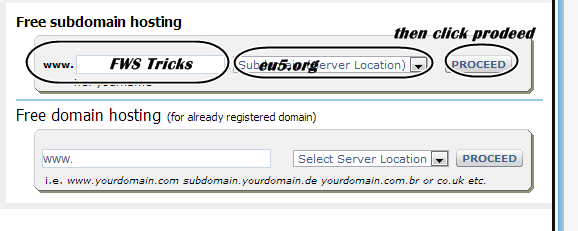
So first go to : Free Hosting Website (use this )

Enter the domain  click proceed (shown below )


-------------------------------------------------------------------------------------------

------------------------------------------------------------------------------------------------------------


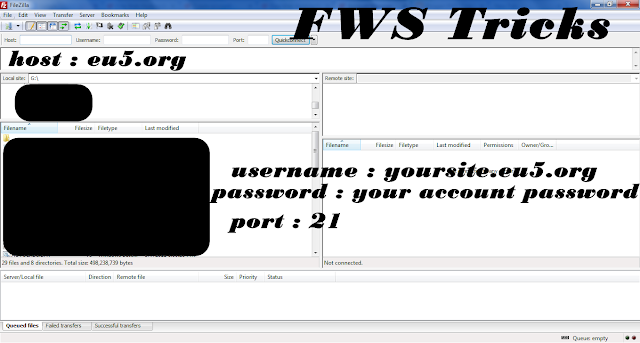
Download Filezilla (search Google)


now delete all the files which is pre-uploaded

Now you have go to a website called :- wordpress.org (click to open)

and download the script from the Right side by clicking Download wordpress

--------------------------------------------------
so after downloading it open the .zip file

open the folder in it 
THE PLACE WHERE YOU FIND WP-admin , WP-content , etc. is the main place
so drag all of them to Filezilla 
*let it upload all files , when the queue = empty then the uploading is meant to be finished  ,  and while uploading all files if you see a message called :- The File Already exists 
then select owerrite ! 


-----------------------------------------------------------

so after uploading open Browser 

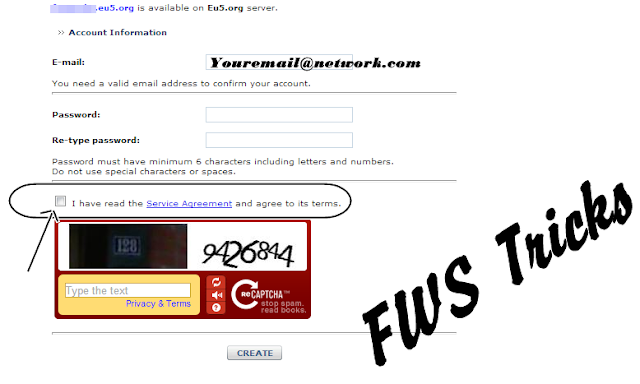
then enter you url which you register in first step!
eg. yoursitehere.eu5.org

then you will see : wordpress error

Then click :  create configuration file

then go to the site from which you make your site : if you make from the site which is in the first step ,only then click here

then enter the site you maked from this site : eg. yoursitehere.eu5.org
Now you will be logged in to the site Click Create DB 
now you will see a number named as username and db name 
Copy it!

---------———---------------------------------------------

come back to wordpress configuration 

you will see some textfeilds
in Username text feild paste the number which you copied 
in db name text field paste the same number 
in host field : localhost
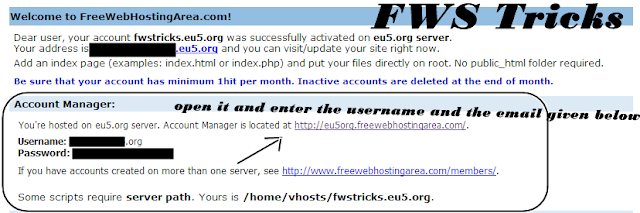
in password the password used on FREEWEBHOSTINGAREA (which i provided in first step)

click next , or whatever is there 
then it will ask site name , etc.. 
you can fill yourself its very easy!!

Cool JavaScript Tricks: Edit Websites in Browser (Live)

Cool JavaScript Tricks: Edit Websites in Browser (Live)

Imagine a world where you are a God and have ultimate control on what happens and more importantly, how it happens. Seems too good a dream. Now it has come true, at least for the online world.

JavaScript tricks
Using this trick, you will be able to edit any webpage live in your browser as if it was a Wiki and change the details according to your wish. Yes, you read that right. You can edit Google or even Facebook for that matter right in your browser and that too without requiring any technical know-how or getting deep into hacking and cracking.

Here is an example picture demonstrating the Google Homepage edited by me to say that I own Google.
Edit Websites Browser

This is just an example. You can use it for anything like showing wrong traffic stats or for fooling people by showing that someone said something about them on Facebook or Twitter. It depends only on your creativity. But I would advise you to stay ethical and use it for entertainment purposes only.

(Mozilla Firefox does not support this. If you use Firefox, you can use the bookmarklets given at the end of this post. If you use Google Chrome and the code does not seem to work, precede it with "javascript:" without quotes.)

To use this trick, all you need to do is just copy the code given below and paste it in your address bar after you have opened the website you wish to edit. And start editing.

javascript:document.body.contentEditable%20=%20'true';%20document.designMode='on';%20void%200
You can capture a screenshot by pressing the Print Screen key or by using the Snipping Tool if you use Windows 7 or Windows Vista. If you wish to again make the website non-editable to give a more authentic look, copy and paste the code given below in the address bar after you are done editing (does not work in Firefox).

javascript:document.body.contentEditable%20=%20'false';%20document.designMode='off';%20void%200

Or, alternatively you can use the following bookmarklets by dragging them to your Bookmarks bar.

1.  Edit this Website

2.  Done Editing

The editing that you do will however be temporary as it is not server-sided. You can also save the modified website through your browser by File>Save. This works on all common web browsers including Chrome, Firefox, Opera and Internet Explorer.

How to Make Blog Fast and Faster


How To Make blog Fast And faster

Hi, friends! Advance, I've posted about a trick to solve How to Make Blog Fast. That's Boost Blog Speed with CSS Compressor. But, now I will discuss some problems to make blog faster. Who don't want their blog become light, surely all of bloggers want it because our visitors can browse our blog easier.

Based on my experience, there are some tricks to make blog fast :

    Make Blog Faster
  • Picture
  • Did you know, pictures with large size can make our blog become slower. So, it's better for you to decrease the use large-size picture. Both in template and also posts. You can use Photoshop Save for Web & Device trick.
  • Widget
  • Over usage widget was one of problems which makes blog become slower. Especially if the widget contains heavy scripts. It's good for you to delete some widgets which unuseful such as clock, music player, pet, games, and so on. Use useful widget such as related posts, most popular articles, or maybe Google Friend Connect.
  • CSS and Javascript
  • As we knew, CSS and javascipt can make our blog become good looking. But the side effect is it can make our blog become slowly. So you should decrease the usage or compress it for your blog. To compress Javascript, you can use Javascript Compressor.

Epilog How to Make Blog Fast and Faster: I think good blog should have a good looking and fast loading. But, don't reduce your creativity on blog. Stay blogging!

Social Media Boost Your Blog Search Engine Rankings

Social Media Boost Your Blog Search Engine Rankings

Role of Different Social Networking Sites in Search Engine

In current scenario, it is going to see that there is a huge role of Social Media to determining the rankings of search engines. It has a huge impact on search engine optimization and day by day. Now let’s have a look about various social networking platforms and how they help to get good rankings,

Facebook

Facebook is the largest social networking sites of the world and facebook business page plays a vital role in getting a good ranking in all major search engines in the following ways,
  • Facebook likes is the best source of increasing inbound links of your website which has a great impact on search engine results
  • Facebook business Page has a great Page rank value which will very good for high rankings search engine In this way facebook plays an important role in SEO and also a great source of increasing your sales trough facebook pages.

Google+

Google+ is the best social networking platforms to get a good ranking because it is an initiative of search engine giant Google. For this reason important of Google+ in increasing day by day and there are lots of people or business organizations joining this social networking platform?. Thus if you are a business owner then you must have a Google+ profile because
  • Google always give a better priority to its own product. So there is a chance of getting quick indexing by the use of Google+
  • As it is Google’s own initiative then it is very much easy for them to integrate numerous data from your Google plus profile which will helps to get a good search engine rankings
  • Google treated Google plus profile or pages like a regular website.
  • There is a chance of getting quick indexing by the use of Google+

LinkedIn

LinkedIn is a one of the popular social media platforms which is also has great effects in search engines. Sharing your content on this social networking sites and post about various topics on your LinkedIn profile or business page we can also able to get a good quality links which will eventually boost your rankings.

Twitter

Twitter is a very popular social networking site and also has a great impact on search engines. In business world importance of twitter is growing day by day because
  • It is a great source of sharing links of various pages of business website which is also get a good value for the rankings in search engine
  • Very much effective to reach at large number of customers in very shortly
Thus twitter also a great social media platform which has a great effect on Search Engine Optimization(SEO)

Pinterest

Pinterest is also a popular social networking site but it increasing it popularity in a rapid way which is also a great role in SEO of a business website.
Conclusion
Social networking sites are getting its importance in rapid way which will help to boost your search engines rankings and there is believe that in coming days it will be the strongest platform for getting a good rankings in search engine.
- See more at: http://www.earn2dollar.com/2013/09/social-media-boost-your-blog-search.html#sthash.ywmlgOyl.dpuf

Search Engine Optimization Techniques to Rank Your Page on Google

Search Engine Optimization Techniques to Rank Your Page on Google 

increase page rank
You need to learn SEO to optimizing your website by implementing Search Engine Optimization techniques. A good SEO Tips can help you to get higher search engine rankings

Search Engine Optimization techniques for modern days SEO

Learn SEO is the best way to know about various techniques which is involved in Search Engine techniques. Generally we can see two types of techniques in Search Engine Optimization. One of them is On Page Optimizations and another one in Off Page Optimization. Below there I mentioned some of the SEO technique which is very much essential for getting a higher rank.

Learn SEO for Keyword Research

Keyword research is the first step of the Search Engine Optimization. It is very much important for getting a higher search engine ranking. Thus you gave to select wisely your keywords because
  • People will generally search your website in the internet by searching through the keywords
  • Keywords plays a vital role in the Search Engine
Hence if you want to learn SEO then first thing you have to know about is keyword Research. It is most effective and primary SEO techniques and without it you can’t get a good ranking in search engines.

Search Engine Optimization techniques of Link Building

Link Building is one of the major SEO techniques which is used by webmasters in order to achieve a good search engine rankings of the website. It is most popular techniques of search engine optimization. There are several ways of building links which is very much effective if you want to a quick search engine ranking in an organic way. Link building is an very effective method to get some inbound links in a website which can be very effective for the quick search engine rankings. There are several methods of link building-
  • Forum posting
  • Blogging is the best link building technique which is one of the popular SEO Tips
  • Social bookmarking
  • Directory submission

SEO Tips for RSS Feed Creation and Submission

RSS Feed Creation and submission are also very much important if you are thinking to learn SEO to optimize your website. It is a very good technique of Search engine Optimization particularly for the blogs.

Content Optimization as Search Engine Optimization techniques

In recent days, Content Optimization gets a huge importance in search engine optimization. There are several ways by applying which you can increase search engine ranking-
  • Use relevant keywords in your content
  • Hyperlink your content with relevant links
Thus Content optimization is one of the best search engine optimization techniques which you may apply for your website or blog to get a good ranking in search engines.

SEO Tips for Meta tag optimization

Meta tag optimization is a key on page optimization techniques which is great Search Engine Optimization techniques to rank your website top of the search engine results.

Conclusion

It is true that a person or a business owner builds a website in order to attract a huge number of visitors at their websites. But it is only possible when you follow the SEO Tips get the visibility in the search engines like Google, Bing or Yahoo. To get visibility in the search engine you have to optimize your website properly with the help of Search Engine Optimization.
- See more at: http://www.earn2dollar.com/2013/10/search-engine-optimization-techniques.html#sthash.UuMDBlXZ.dpuf

Web Analytics Increase Sales and Traffic of Your Website

Web Analytics Increase Sales and Traffic of Your Website

Web analytics plays a significant role for analyzing consumer behavior of a website. A website owner can get the information about the website traffic by using this tool.

Benefits of using Web Analytics

In modern days web analytics plays a vital role to implement a proper online marketing strategy and there are many business organizations you can see who is using this tool to get success in the online platform. Below here is a brief discussion about some great benefits of website analytics-

Getting the proper information about the source of the traffic

Website analytics is the best source of getting information about the traffic. As it is very much essential for a business organization to measurement of the traffic which they are getting through their website because-
  • They can implement their further marketing policy if they have a clear idea about the sources of the traffic
  • If there is anything wrong in their strategy then they can rectify it
Thus it is great source tom know about the geographical or other source of the website traffic and has a great role on the implementation of proper marketing strategy.

Help to measure your offline campaign

It is very important to measure the offline data of a business so that a company has total information about the whole marketing campaign. Web site analytics are such a tool where a company or business organization can track the record of their offline campaign like sales through phone call or an ad campaign. You gave to do following things in order to get it-
  • You have to enable auto tagging
  • You must able to store each GCLID with information of the prospect which you have gathered on your website to analyze consumer behavior.
  • Make sure that you can changes the codes of all of your web pages.
  • You should have a click-to conversion cycle which is uploaded in less than 90 days.

Event tracking

With the help of this analytical tool a business organization can track the consumer behavior about a single event which is very much effective for implementation of a good marketing policy.

Measurement of the conversion rate

This analytical tool is great source of measure the conversion rate of a website. With the help of this data that a business owner can implement his marketing policy with out any fear. You can measure the conversion rate for the following purposes-
  • You can able to measures the conversion rate of the contents of your website. So that you will able to know which contents of your website are gaining more popularity and are able to attract the most viewers.
  • Measures the conversion rate of the keywords of the website. Thus you will get a fair idea about you are getting maximum viewers through which keywords.
  • You can also measures about which pages of your website are visited by maximum number of visitors and you will able to know tat which pages are most popular.
Hence to get a fair idea about the conversion rate web analytics are the best tool and that why it is getting very much amongst the webmasters as well as website owners.

Help to know site functionality

This tool helps to know about the site functionality and consumer behavior like how much time does your visitors are spending on your website etc.

Conclusion

When a business organization builds a website then its main objective of preparing a website must be to gain more website traffic or consumers and increase the sales volume through World Wide Web. Website analytics is a best way to help them to fullfill their desire.
- See more at: http://www.earn2dollar.com/2013/10/web-analytics-increase-sales-traffic.html#sthash.xWTG8Jnv.dpuf

addd

adtest

Powered by Blogger.