ad1

Showing posts with label Android Black Market. Show all posts

Popular Android Phone Trends for Cell Phone Watchers

Popular Android Phone Trends for Cell Phone Watchers

 
Popular Android Phone Trends for Cell Phone Watchers
The launch of Samsung Galaxy S III, Android Jelly Bean, LG Nexus 4, HTC One X and a host of other smart phones has brought about revolutionary changes in the world of Android. Power packed with innumerable applications and features, these phones offer advanced and cutting edge technology for all users.


Even as cell phone watchers are being awed by their attractive designs, application downloading facilities, Linux based operating systems, global team of software professionals developers, performance profiling, debugging tools/plug-ins and a host of other personalized features; they are looking for more enhanced features and benchmarked performances in 2013.

So, what are the popular trends to look out?

Much Bigger Screens

android phone sizes
Android phones are now becoming synonymous with huge displays and larger screen sizes. With the high end 5.5-inch Samsung Galaxy Note II and 4.8-inch Samsung Galaxy S III making their presence felt with mammoth screens, larger display areas have created a big impact in the world of telecommunication and smart phones alike.

Happy times are in store for lovers with supersized smart phones models like Galaxy S IV with 4.99 inches of screen size and Galaxy Note III with 5.9 inches waiting to catch their attention. Following the footsteps of Samsung, other manufacturers are now extrapolating their screen sizes—in more ways than one.

Processors—Quad Core and Octa-Core

android samsung processors
Dual core processors are now passé. Cell phone watches are now being set for models which boast of quad core and octa core processors. These processors allow effective handling of more than one task at a given point of time and go a long way in improving overall performance. So, with quad core processors in hand, users are tapping into their other tasks along with watching their favorite movie on a small sized window on their display screen. .

While quad-core processors have already become a standard feature in most notable android phones, the first octa-core smart phone is all set to make its appearance at the end of 2013- in the Galaxy Note III.

TV Control

android phone tv controller
It’s a dream which may come true for many android users and television buffs. Cell watch circles are now buzzing with the news that future mobile sets are ready to boast of TV control features-- which will allow users to fling away their remote controls.
These smart applications will not require the purchase of set-top boxes or any software downloads. The HTC one already comes packaged with an IR emitter which has the abilities of manipulating volume, power, channels and almost every other essential feature of television sets. Android makers may soon follow suit to keep up with the competition.

Getting closer towards Indestructibility

You can expect more smart phones getting closer to indestructibility. With Sony’s flagship product Xperia Z offering waterproof features and Corning unveiling its Gorilla Glass 3, which is shatter proof beyond compare-- the going cannot get any better for users looking for almost indestructible products. Its certainly nice to have a phone which is more robust, durable and stronger than their other counterparts.

Android based applications and phones are setting the grounds for an increasingly excellent crop.Watch out for more!

5 killer whats app tricks ! (top ) one must know


5 killer whats app tricks ! (top ) one must know

Source :- Useful Info 4 Uth
#1: How to Backup and Restore Chats in WhatsApp

Take Backups of messages will help you when whatsapp removed or deleted the messages. WhatsApp allow you to take backup manually along with it’s automatic backups.

Follow the below steps to take backup in WhatsApp :

On iPhone, Go to- Settings > Chat Settings > Chat Backup, then tap Back Up Now.

On Android Devices, Go to Settings > Chat settings > Backup conversations

#2: How to hide WhatsApp Images From Gallery

WhatsApp will auto download the images that you recieved. If you wish to hide the whatsapp images from gallery, Follow the below steps.

On iPhone, Go to- Settings > Privacy > Photos and then turn the WhatsApp switch off.

On Android Devices, Download Whatsapp Images Hide Android App and install it, then tap on the WhatsApp images folder to hide it.
( https://play.google.com/store/apps/details?id=com.chaweng.imageshide )

#3: Show WhatsApp Chat Heads like Facebook Messenger

If you are Facebook messenger user you saw the chat heads on the screen. You can also use chat heads to chat with friends on WhatsApp. It will help you to chat with friends when working on any other application. This also help you to save time and make the task easy. For show it, Install [WhatsApp]Chat Heads ROOT BETA Application. (This App needs root access). (https://play.google.com/store/apps/details?id=com.seebye.chatheads )

#4: How to Change your WhatsApp Phone Number

You can change your current whatsapp to a new one easily. If you change your number, you didn’t want to unistall whatsapp. You can change it from the whatsapp application. To change your phone number follow the below steps.

On Android Devices, Go to - Settings > Account > Change number

#5: How to Lock your WhatsApp Messages

If your whatsapp account contains secret messages, it is must to lock it from public access. You can lock your whatsapp on Android with some applications. Install WhatsApp ( https://play.google.com/store/apps/details?id=com.xtension.WhatsappLock ) lock application on Android to secure your WhatsApp messages using Password.

How to run JAR files on Android | Install Jar on Android SIMPLE

How to run JAR files on Android | Install Jar on Android SIMPLE!!!Nokia is one of the famous mobile phone which is using Symbian operating system. Users who all are moved from Nokia to android mobiles like SAMSUNG, HTC and so on will miss their favorite jar application.
We all have the doubt like whether we can run jar files on Android or not, but now it’s possible with the application JBED.


--------------------------------------------------------------------process-----------------------------------


What is JBED?

JBED is an .apk Android application which Run Java Games and Apps on Your Android Device. JBED is a Java Android Java Emulator, by using this application you can install .JAR/.JAD/Java/J2ME/MIDP games on Android phones. Now you can use all of your favorite .JAR application in your phones.
run jar files on android

Steps to Install Jar on Android:

  1. Download JBED
  2. Install JBED.apk in your Android Phone. Install JBED.apk is not different process. It also the same installation process like other Android applications.
  3. Launch JBED application. Press menu button and choose SD card.
  4. Select your .JAR/.JAD file that you want to install and run.
  5. Now install the chosen application through JBED.
  6. Now open the installed java application to run.
By this method we can run jar files on android phones. If you face any issue while installing JAR application then your mobile is not supporting fully. If you successfully install the JAR application also sometimes you will get some graphical and performance related issues.

Fix Solved JBED Errors

So many people has complaint that this JBED application is not working and throwing some errors in mobiles like orce Close” or ” Maybe no sd Card or SD card is busy errors.
Reason for the errors is JBED only works with below Android version 2.3.4.

How to avoid errors while using JBED application

You Android should be rooted with system manager or some other application.
  1. Download libjbedvm.so (google IT!) and place in system\lib folder
  2. Install the JBED.apk application and don’t play it.
  3. Restart the mobile, and now try it.
If you face any issues please share with us it will helpful to all.

How to Download Paid Android Apps for Free from Google Play

How to Download Paid Android Apps for Free from Google Play
As you know most of the apps/ games in Google Play are free. Even though there are trail and free versions most of them have limitations or will be full of ads. (i have already posted on how to remove ads from Android Apps). But this technique is really different.You can download and install any paid application on Google Play for free. This is a 100% working technique. You can alsoDownload and install paid android games for free using this technique. Given below are the steps to do it.


HOW TO DOWNLOAD AND INSTALL PAID APPS FROM GOOGLE PLAY FOR FREE

Note: There are 3 steps involved here. Carefully read them. First one is find the application. Second is downloading the application and finally third one is installing them without any errors

STEP 1: FIND THE APPLICATION ON GOOGLE PLAY (OPTIONAL) 

The first thing you need to do is to find the required application on Google Play. If you find the application, just note down the 'version' of applications. You will find the version in 'What's new' (else in 'Description') for example v1.2.3

STEP 2: DOWNLOAD THE  APPLICATION'S APK FILE

You may be wondering how will you get the paid application. Given below is the method.
  1. Download and Install 4shared application
  2. Open 4shared application and create an account (others sign in)
  3. From the menu select 'Advanced Search'. Not ordinary search
  4. In the file name give the name of application with version number ex: TurboFly 3D v1.2.3 (or Turbofly full)
  5. Select 'Android Apps' from 'Type of file' and search
  6. Many applications will be listed. Download the first one
NOTE: After downloading DON'T INSTALL. Go for step 3  

STEP 3: REMOVE LICENSE VERIFICATION AND INSTALL

After downloading, when you try to install the app, 90% apps will not get install. This is because while installing they check for license in Google Play. If not it will not be installed. So we have to remove license verification. Here are the steps

  1. Download and Install Lucky Patcher

  2. Open Lucky Pathcer
  3. Select 'Rebuild and Install'Select the downloaded file from 4Shared (usually in sdcard/4SHARED.COM)
  4. From the menu select 'Rebuild' then select 'Apk with removed License Verification'Select Auto mode and click 'Rebuild Application'

  5. New APK file will be created in "sdcard/LuckyPatcher/Modified". Install it through LuckyPatcher itself
  6. Done.

If any application had not worked or got any type of errors please comment below. I will surely find a solution for you.

Need for Speed™ Most Wanted v1.0.46 APK + sd data Fixed Link


Need for Speed™ Most Wanted v1.0.46 APK + sd data Fixed Link

Need for Speed™ Most Wanted v1.0.46 APK + sd data Fixed Link 


Need for Speed™ Most Wanted play.google.com.games.nfs13_na
Buckle up, hit the gas and hold on tight; you’re in for the ride of your life. Outrun cops, outsmart rivals – and outdrive your friends – in the most dangerous Need for Speed yet. Do you dare to be the Most Wanted?

Need for Speed Most Wanted is an immersive, high quality game that requires a 350MB+ download. To speed things up, we recommend connecting to WiFi. We promise – it’s worth it!

MAKE TROUBLE, GET WANTED
Evade a relentless police force while you clash with street racers. Race and chase hot cars like the SRT Viper GTS, Porsche 911 Carrera S, Hummer H1 Alpha, and many more. Feel the intensity of no-brakes-allowed street racing with realistic full-car damage for the first time on mobile.

LEAVE YOUR MARK
Log into Origin to check the Wanted List and find out who is the Most Wanted across platforms and among your friends. Then, challenge your friends and prove your racing skills in nonstop competition.

GO FROM ZERO TO MOST WANTED…
Drive and customize over 35 of the world’s most exciting cars
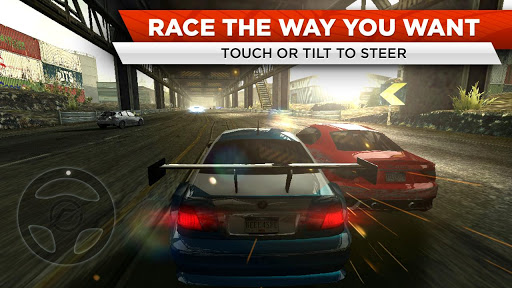
Race the way you want! By popular demand, you can now touch or tilt to steer
Use Mods to enhance your car and get ahead of the pack in style
Experience the action with mind-blowing graphics and intense full-car damage
Earn Speed Points to unlock new cars
Your rivals will do everything they can to stop you from getting to the top – but in this world, there can only be one Most Wanted
.

What's in this version: (Updated : Dec 18, 2012)

UPDATE NOW FOR MORE CARS AND NEW EVENTS!
Start trouble in the new Marussia B2 and the Pagani Zonda R
Test-drive your fresh wheels in 2 new Hot Rides Events
Race NFS Edition cars like the Hummer H1 Alpha! Get ‘em fast – each car is available for ONE week only
Collect as many new rides as you can to unlock brand-new milestones
We’ve also made some under-the-hood upgrades to keep your game finely tuned and running smooth. Like this update? Tell us and we’ll keep you racing in high gear!
Required Android O/S : 2.3.3+


Screenshots :


Link Fixed 
Download : 12Mb APK

Instructions :
Install APK
Download data via Wifi or Download sd data
Run the game offline

Asphalt 7: Heat v1.0.4 Full Version (Apk+Data) Link Fixed

Asphalt 7: Heat v1.0.4 Full Version (Apk+Data) Link Fixed

Asphalt 7: Heat v1.0.4 Full Version (Apk+Data) Link Fixed


Asphalt 7: Heat :

A FIRST-CLASS LINEUP
Drive 60 different cars from the world’s most prestigious manufacturers, like Ferrari, Lamborghini and Aston Martin, including the legendary DeLorean.

RACE ACROSS THE GLOBE
Gear up to race on 15 tracks set in real cities around the world, including brand new tracks in Hawaii, Paris, London, Miami and Rio.

CHALLENGE THE WORLD
The completely revamped multiplayer lets you take on up to 5 of your friends locally or online. Keep track of who’s the best with the new Asphalt Tracker that lets you compare stats, show off achievements and challenge rivals. You can also find new online opponents with the matchmaking system. Practice haHit the speed of heat in the newest, fastest, most visually stunning edition of the famed Asphalt series.

A FIRST-CLASS LINEUP
Drive 60 different cars from the world’s most prestigious manufacturers, like Ferrari, Lamborghini and Aston Martin, including the legendary DeLorean.

RACE ACROSS THE GLOBE
Gear up to race on 15 tracks set in real cities around the world, including brand new tracks in Hawaii, Paris, London, Miami and Rio.rd, because there are special events that will pit you against the best in the world!
YOUR WAY OR THE HIGHWAY
Play however you please with 6 different game modes packed with 15 leagues and 150 different races.

CUTTING EDGE GRAPHICS 
Every car and track is more beautiful than ever thanks to graphics that push the limits of your device and the Retina display.

A RECORD OF SUCCESS
Acclaimed by both media and players, the Asphalt license has already attracted several million players worldwide... Come and join the ride!

What's in this version: (Updated : Dec 7, 2012)
★Ready to hit the speed of heat once more?★
Gear up for the most exciting Asphalt update yet!
New special events with 2 wild Nissan challenges
New limited-time Nissan track through Tokyo
2 brand new Nissan cars: the Juke nismo and Juke-R
Come, join the race and challenge the world!
Required Android O/S : 2.2+


Instructions: 
Install APK
Copy 'com.gameloft.android.ANMP.GloftA7HM' folder to 'sdcard/Android/Obb/' (If you have installed v1.0.3 no need to download main obb)
Extract Patch.1040 OBB to 'sdcard/Android/Obb/com.gameloft.android.ANMP.GloftA7HM' folder
Launch the game (run online@ 1st run)

Blackmart Alpha v0.49.93.apk Download link fixed

Blackmart Alpha v0.49.93.apk Download link fixed

Blackmart Alpha v0.49.93.apk Download


Blackmart Alpha allows you to download for free any paid application available on their servers. The application has an excellent user interface that lets you search and find apps and games easily. Although the downloads are not the fastest, they are usually very stables.

Blackmart also has filters that allows you to sort applications by name, size, price, date and value and gives you the ability to uninstall applications and make a backup of them.


Download CLICK THE LINK  


Drag Racing 3D v1.4 APK

Drag Racing 3D v1.4 APK

Drag Racing 3D v1.4 APK


Drag Racing 3D :
Drag Racing 3D - dynamic races, real cars, real records. Try it now!

Features:
Dynamic races by 1/4 and 1/2 mile
More than 20 of these cars: from the urban sedans to professional sport cars
A large number of combinations of improvements cars
Ability to paint the car and rims any color
Detailed statistics of each race and game progress
Career mode allows you to go all racers way - from beginner to professional
Quick Race mode helps to choose a unique opponent for each race
Maintain records system can achieve better results in each race
The game is fully translated for English and Russian languages
Attention! For comfortable game screen resolution should be 800x480 pixels and more!
In the settings you can select the desired level of graphics, thereby increasing the performance of your device.

What's in this version : (Updated : Dec 30, 2012)
Fixed a problem with the display of cars on devices with GPU Mali (Samsung Galaxy S2, Galaxy S3, Galaxy Note, etc.)
Reworked some rough roads in the race
Fixed bug with disappearing wheels in car crashed
Changed game behavior in a crash in the race
Fixed game in his career up to level 10 and a fast race above level 8
Improve the texture of some buildings in the city
Slightly modified the calculation of the sound engine for vehicles
General optimization

Required Android O/S : 2.0.1+

Screenshots :


BIG! Full Screen Caller ID Pro v2.2.5 APK

BIG! Full Screen Caller ID Pro v2.2.5 APK

BIG! Full Screen Caller ID Pro v2.2.5 APK


BIG! Full Screen Caller ID Pro :
Set a full-screen photo for your friends and enjoy vivid and high definition caller photos.
Connect with Facebook to download friends photos.
Doesn't work with MIUI ROM - they block third party apps of this type.

Features:
connect with facebook, and download full-screen photos automatically(and browse albums!),
customize caller ID screen content,
switch between caller screen Themes, choose click or slider,
choose full screen caller ID for all or only a few contacts,
full screen caller for incoming calls,
full screen caller for outgoing calls.
Themes Editor
go to Themes,
select and edit,
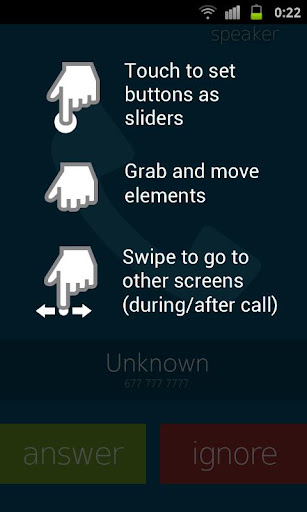
move buttons by holding and dragging,
switch to slider with a single click on a button (FIRST you need to drag a button to the edge of the screen)
change default contact photo from the MENU button,
switch to other states of a call by swiping left or right,
reset to default from the MENU button
What's in this version : (Updated : Dec 18, 2012)
Minor layout changes,
Screen dim improvements,
Translations improvements
Required Android O/S : 2.1+

Screenshots :


addd

adtest

Powered by Blogger.